OkHttp 官方中文文档
Calls
HTTP 客户端的工作是接收你的 Request(请求),并生成对应的 Response(响应)。理论上这很简单,但在实践中却非常棘手。
1.1 请求 (Request)
每个 HTTP 请求都包含一个 URL、一个方法(如 GET 或 POST)以及一个请求头列表(Headers)。请求还可以包含一个请求体(Body):即特定内容类型的数据流。
1.2 响应 (Response)
每个 HTTP 响应都包含一个状态码(如 200 代表成功,404 代表未找到)、一个响应头列表(Headers)以及一个可选的响应体(Body)。
1.3 重写请求
当 OkHttp 发送 HTTP 请求时,你描述的是一个高层次的要求:“帮我获取这个 URL 并带上这些请求头。”为了正确性和效率,OkHttp 会在发送前重写你的请求。
OkHttp 可以在原始请求中添加请求头,包括 Content-Length、Transfer-Encoding、User-Agent、Host、Connection 和 Content-Type。除非请求头中已存在压缩响应的相关标识,否则它还将添加一个 Accept-Encoding 请求头。如果你配置了 Cookies,OkHttp 还会添加 Cookie 请求头。
某些请求可能会有缓存的响应。当缓存的响应不是最新时,OkHttp 会发送一个条件 GET 请求以下载更新的响应(如果它比缓存更新)。此时它会添加必要的请求头,如 If-Modified-Since 和 If-None-Match。
1.4 重写响应
如果使用了透明压缩,OkHttp 会移除相应的响应头 Content-Encoding 和 Content-Length,因为它们不再适用于解压后的响应体(Body)。
如果条件 GET 成功,在指定规范下,响应将来自网络和缓存的合并结果。
1.5 后续请求
当请求的 URL 已移动时,Web 服务器将返回状态码(如 302),表明文档的新 URL。OkHttp 将遵循重定向检索最终响应。
如果响应问题是授权质询(Authorization Challenge),OkHttp 将尝试进行身份验证(如果已配置)。如果提供了身份验证凭据,请求将带着凭证重试。
1.6 请求重试
有时连接会失败:可能是连接池已过时且断开,或是 Web 服务器本身无法访问。如果有可用路径,OkHttp 将使用不同的路由进行请求重试。
1.7 Call
经过重写、重定向、后续请求和重试,你简单的要求可能会产生很多请求和响应。OkHttp 使用 Call 任务模型,通过许多必要的中间请求和响应来满足你的请求。通常情况,这并不会产生很多请求!如果你的 URL 被重定向,或者故障转移到另一个 IP 地址,欣慰的是你的代码会继续正常工作。
Call 通过以下两种方式进行:
- 同步:线程会阻塞,直到响应可读。
- 异步:你在任何线程排队请求,当响应可读时,你会在另一个线程得到 回调 (Callback)。
Call 可以在任何线程中取消。如果尚未完成,它将作为失败的 Call 处理!当 Call 被取消时,如果代码试图写入请求体(Request Body)或读取响应体(Response Body),将遭受 IOException 异常。
1.8 调度
对于同步调用,你需自带线程,并负责管理并发请求。并发连接过多会浪费资源;过少则危害等待时间。
对于异步调用,调度器 (Dispatcher) 实现了最大同时请求策略。你可以设置每个 Web 服务器的最大值(默认值为 5),以及整体最大值(默认为 64)。
Connections
虽然只提供了 URL,但 OkHttp 计划使用三种类型的连接连接到你的 Web 服务器:URL、Address 和 Route。
2.1 URLs
URLs(如 https://github.com/square/okhttp)是 HTTP 和因特网的基础。除了作为网络上通用和分散的命名方案,它们还指定了如何访问网络资源。
URLs 摘要:
- 它们指定该 Call 可以被明文(HTTP)或加密(HTTPS),但不指定用哪种加密算法。它们也不指定如何验证对方的证书(HostnameVerifier)或证书是否可信(SSLSocketFactory)。
- 它们不指定是否应使用特定的代理服务器,或如何与该代理服务器进行身份验证。
它们还具体指定:每个 URL 识别特定的路径(如 /square/okhttp)和查询参数(如 ?q=sharks&lang=en)。每个 Web 服务器主机对应一个 URL。
2.2 Addresses
Address 指定网络服务器(如 github.com)以及连接到该服务器所需的所有静态配置:端口号、HTTPS 设置和首选的网络协议(如 HTTP/2 或 SPDY)。
共享相同 Address 的 URL 可以共享相同的基础 TCP 套接字连接。共享连接具有实实在在的性能优点:更低的延迟、更高的吞吐量(由于 TCP 慢启动)和节省电池。OkHttp 使用 ConnectionPool 自动重用 HTTP/1.x 的连接以及多样的 HTTP/2 和 SPDY 连接。
OkHttp Address 的某些字段来自 URL(scheme, hostname, port),其余来自 OkHttpClient。
2.3 Routes
Route 提供连接到网络服务器所必需的动态信息。即尝试特定的 IP 地址(如由 DNS 查询发现),使用确切的代理服务器(如果特定的 IP 地址的 ProxySelector 在使用中)和协商的 TLS 版本(HTTPS 连接)。
可能有单个 Address 对应多个 Route。例如,托管在多个数据中心的 Web 服务器,可能会在其 DNS 响应中产生多个 IP 地址。
2.4 Connections
当你使用 OkHttp 进行一个 URL 请求时,操作流程如下:
- 它使用 URL 和配置的 OkHttpClient 创建一个 Address。此地址指定我们将如何连接到网络服务器。
- 它通过 Address 从连接池中取回一个连接。
- 如果池中没有找到连接,它会选择 Route 尝试。这通常意味着使用 DNS 请求获取服务器的 IP 地址。如果需要,它会选择一个 TLS 版本和代理服务器。
- 如果是一个新的 Route,它将通过建立直接的 Socket 连接、使用 TLS 安全通道的 Socket 连接(用于通过 HTTP 代理的 HTTPS),或直接 TLS 连接来进行连接。TLS 握手是必要的。
- 它发送 HTTP 请求并读取响应。
如果有连接出现问题,OkHttp 将选择另一条 Route 再试一次。这带来的好处是当服务器地址的一个子集不可达时,OkHttp 能够自动恢复。当连接池过时或者尝试的 TLS 版本不受支持时,这种方式非常有用。
一旦响应被接收,该连接将被返回到池中,以便在未来的请求中重用。连接在池中闲置一段时间后,会被移除。
Recipes
我们写了一些示例方法,演示如何解决 OkHttp 常见问题。通过阅读它们了解一切是如何正常工作的。你可以自由剪切和粘贴这些例子。
3.1 同步获取
下载文件,打印其头部,并以字符串形式打印其响应体。
string() 方法在响应体中是方便快捷的小型文件处理方式。但是,如果响应体较大(大于 1 MiB),它会将整个文件加载到内存中,所以应避免使用 string()。在这种情况下,更倾向于将响应体作为流进行处理。
private final OkHttpClient client = new OkHttpClient();

public void run() throws Exception {
    Request request = new Request.Builder()
        .url("http://publicobject.com/helloworld.txt")
        .build();

    Response response = client.newCall(request).execute();
    if (!response.isSuccessful()) throw new IOException("Unexpected code " + response);

    Headers responseHeaders = response.headers();
    for (int i = 0; i < responseHeaders.size(); i++) {
        System.out.println(responseHeaders.name(i) + ": " + responseHeaders.value(i));
    }

    System.out.println(response.body().string());
}
3.2 异步获取
在工作线程中下载文件,当响应可读时,获取回调(Callback)。当响应头准备好后,将产生回调。读取响应体可能一直阻塞。目前 OkHttp 不提供异步 API 来接收响应体的部分内容。
private final OkHttpClient client = new OkHttpClient();

public void run() throws Exception {
    Request request = new Request.Builder()
        .url("http://publicobject.com/helloworld.txt")
        .build();

    client.newCall(request).enqueue(new Callback() {
        @Override public void onFailure(Call call, IOException e) {
            e.printStackTrace();
        }

        @Override public void onResponse(Call call, Response response) throws IOException {
            if (!response.isSuccessful()) throw new IOException("Unexpected code " + response);

            Headers responseHeaders = response.headers();
            for (int i = 0, size = responseHeaders.size(); i < size; i++) {
                System.out.println(responseHeaders.name(i) + ": " + responseHeaders.value(i));
            }

            System.out.println(response.body().string());
        }
    });
}
3.3 访问头
典型的 HTTP 头工作就像一个 Map<String, String>:每个字段有一个值或无值。但是,一些头部(Headers)允许多个值,比如 Guava 的 Multimap。例如,HTTP 响应常提供多个 Vary 头。OkHttp 的 API 试图使这两种情况都能舒适使用。
当写请求头时,用 header(name, value) 来为唯一出现的 name 设置 value。如果本身存在值,在添加新的 value 之前,它们会被移除。使用 addHeader(name, value) 来添加头部,不需要移除当前存在的 Headers。
当读取响应头时,用 header(name) 返回最后设置 name 的 value。如果没有 value,header(name) 将返回 null。可以使用 headers(name) 来读取所有列表字段的值。
要访问所有的头部,用 Headers 类,它支持索引访问。
private final OkHttpClient client = new OkHttpClient();

public void run() throws Exception {
    Request request = new Request.Builder()
        .url("https://api.github.com/repos/square/okhttp/issues")
        .header("User-Agent", "OkHttp Headers.java")
        .addHeader("Accept", "application/json; q=0.5")
        .addHeader("Accept", "application/vnd.github.v3+json")
        .build();

    Response response = client.newCall(request).execute();
    if (!response.isSuccessful()) throw new IOException("Unexpected code " + response);

    System.out.println("Server: " + response.header("Server"));
    System.out.println("Date: " + response.header("Date"));
    System.out.println("Vary: " + response.headers("Vary"));
}
3.4 POST String
使用 HTTP POST 的请求体发送到服务。下面例子 POST 了一个 Markdown 文档到一个 Web 服务(将 Markdown 作为 HTML)。由于整个请求体是同时在内存中,应避免使用此 API 发送较大(大于 1 MiB)的文件。
public static final MediaType MEDIA_TYPE_MARKDOWN
        = MediaType.parse("text/x-markdown; charset=utf-8");

private final OkHttpClient client = new OkHttpClient();

public void run() throws Exception {
    String postBody = ""
            + "Releases\n"
            + "--------\n"
            + "\n"
            + " * _1.0_ May 6, 2013\n"
            + " * _1.1_ June 15, 2013\n"
            + " * _1.2_ August 11, 2013\n";

    Request request = new Request.Builder()
            .url("https://api.github.com/markdown/raw")
            .post(RequestBody.create(MEDIA_TYPE_MARKDOWN, postBody))
            .build();

    Response response = client.newCall(request).execute();
    if (!response.isSuccessful()) throw new IOException("Unexpected code " + response);

    System.out.println(response.body().string());
}
3.5 POST Streaming
在这里,我们 POST 请求体作为 Stream。将正在生成请求体的内容写入到 Stream 中。下面例子 Streams 直接进入 Okio 缓冲水槽。你的程序可能更喜欢使用 OutputStream,你可以通过 BufferedSink.outputStream() 获得 OutputStream。
public static final MediaType MEDIA_TYPE_MARKDOWN
        = MediaType.parse("text/x-markdown; charset=utf-8");

private final OkHttpClient client = new OkHttpClient();

public void run() throws Exception {
    RequestBody requestBody = new RequestBody() {
        @Override public MediaType contentType() {
            return MEDIA_TYPE_MARKDOWN;
        }

        @Override public void writeTo(BufferedSink sink) throws IOException {
            sink.writeUtf8("Numbers\n");
            sink.writeUtf8("-------\n");
            for (int i = 2; i <= 997; i++) {
                sink.writeUtf8(String.format(" * %s = %s\n", i, factor(i)));
            }
        }

        private String factor(int n) {
            for (int i = 2; i < n; i++) {
                int x = n / i;
                if (x * i == n) return factor(x) + " × " + i;
            }
            return Integer.toString(n);
        }
    };

    Request request = new Request.Builder()
            .url("https://api.github.com/markdown/raw")
            .post(requestBody)
            .build();

    Response response = client.newCall(request).execute();
    if (!response.isSuccessful()) throw new IOException("Unexpected code " + response);

    System.out.println(response.body().string());
}
3.6 POST File
将文件作为请求体是很容易的。
public static final MediaType MEDIA_TYPE_MARKDOWN
        = MediaType.parse("text/x-markdown; charset=utf-8");

private final OkHttpClient client = new OkHttpClient();

public void run() throws Exception {
    File file = new File("README.md");

    Request request = new Request.Builder()
            .url("https://api.github.com/markdown/raw")
            .post(RequestBody.create(MEDIA_TYPE_MARKDOWN, file))
            .build();

    Response response = client.newCall(request).execute();
    if (!response.isSuccessful()) throw new IOException("Unexpected code " + response);

    System.out.println(response.body().string());
}
3.7 发布表单参数
使用 FormBody.Builder 建立一个请求体,它就像一个 HTML 的表单标记。Names 和 Values 将使用 HTML 兼容的表单 URL 编码进行编码。
private final OkHttpClient client = new OkHttpClient();

public void run() throws Exception {
    RequestBody formBody = new FormBody.Builder()
            .add("search", "Jurassic Park")
            .build();
    Request request = new Request.Builder()
            .url("https://en.wikipedia.org/w/index.php")
            .post(formBody)
            .build();

    Response response = client.newCall(request).execute();
    if (!response.isSuccessful()) throw new IOException("Unexpected code " + response);

    System.out.println(response.body().string());
}
3.8 发布 Multipart 请求
MultipartBody.Builder 可以构建与 HTML 文件上传表单兼容的复杂请求主体。Multipart 请求体的每一部分本身就是请求体,并且可以定义自己的头部。如果存在,这些头应该描述部分的请求体,如它的 Content-Disposition。如果 Content-Length 和 Content-Type 头部可以使用,则它们会自动添加。
private static final String IMGUR_CLIENT_ID = "...";
private static final MediaType MEDIA_TYPE_PNG = MediaType.parse("image/png");

private final OkHttpClient client = new OkHttpClient();

public void run() throws Exception {
    // Use the imgur image upload API as documented at https://api.imgur.com/endpoints/image
    RequestBody requestBody = new MultipartBody.Builder()
            .setType(MultipartBody.FORM)
            .addFormDataPart("title", "Square Logo")
            .addFormDataPart("image", "logo-square.png",
                    RequestBody.create(MEDIA_TYPE_PNG, new File("website/static/logo-square.png")))
            .build();

    Request request = new Request.Builder()
            .header("Authorization", "Client-ID " + IMGUR_CLIENT_ID)
            .url("https://api.imgur.com/3/image")
            .post(requestBody)
            .build();

    Response response = client.newCall(request).execute();
    if (!response.isSuccessful()) throw new IOException("Unexpected code " + response);

    System.out.println(response.body().string());
}
3.9 通过 Gson 解析响应的 JSON
Gson 是实现 JSON 和 Java 对象之间便利转换的 API。这里,我们用它来解码从 GitHub 的 API 响应的 JSON。
需要注意的是 ResponseBody.charStream() 使用的 Content-Type 响应头进行解码时,所使用的字符集默认为 UTF-8。
private final OkHttpClient client = new OkHttpClient();
private final Gson gson = new Gson();

public void run() throws Exception {
    Request request = new Request.Builder()
            .url("https://api.github.com/gists/c2a7c39532239ff261be")
            .build();
    Response response = client.newCall(request).execute();
    if (!response.isSuccessful()) throw new IOException("Unexpected code " + response);

    Gist gist = gson.fromJson(response.body().charStream(), Gist.class);
    for (Map.Entry<String, GistFile> entry : gist.files.entrySet()) {
        System.out.println(entry.getKey());
        System.out.println(entry.getValue().content);
    }
}

static class Gist {
    Map<String, GistFile> files;
}

static class GistFile {
    String content;
}
3.10 响应缓存
要缓存响应,你需要有一个缓存目录来进行读取和写入,并限制缓存的大小。缓存目录应该是私有的,不被信任的应用程序不能够阅读其内容!
多个缓存同时访问相同的缓存目录是错误的。大多数应用程序应该调用一次 new OkHttpClient(),在任何地方都使用相同的实例和自己的缓存配置。否则,这两个缓存实例将相互干扰,破坏响应缓存,这可能使你的程序崩溃。
响应缓存使用 HTTP 头进行配置。你可以添加请求头 Cache-Control: max-stale=3600,这样 OkHttp 的缓存就会遵循它们。你的网络服务器可以通过自己的响应头配置缓存多长时间的响应,如 Cache-Control: max-age=9600。有缓存头强制缓存的响应,强制网络响应,或强制使用条件 GET 验证的网络响应。
private final OkHttpClient client;

public CacheResponse(File cacheDirectory) throws Exception {
    int cacheSize = 10 * 1024 * 1024; // 10 MiB
    Cache cache = new Cache(cacheDirectory, cacheSize);

    client = new OkHttpClient.Builder()
            .cache(cache)
            .build();
}

public void run() throws Exception {
    Request request = new Request.Builder()
            .url("http://publicobject.com/helloworld.txt")
            .build();

    Response response1 = client.newCall(request).execute();
    if (!response1.isSuccessful()) throw new IOException("Unexpected code " + response1);

    String response1Body = response1.body().string();
    System.out.println("Response 1 response:          " + response1);
    System.out.println("Response 1 cache response:    " + response1.cacheResponse());
    System.out.println("Response 1 network response:  " + response1.networkResponse());

    Response response2 = client.newCall(request).execute();
    if (!response2.isSuccessful()) throw new IOException("Unexpected code " + response2);

    String response2Body = response2.body().string();
    System.out.println("Response 2 response:          " + response2);
    System.out.println("Response 2 cache response:    " + response2.cacheResponse());
    System.out.println("Response 2 network response:  " + response2.networkResponse());

    System.out.println("Response 2 equals Response 1? " + response1Body.equals(response2Body));
}
使用 CacheControl.FORCE_NETWORK 可以禁止使用缓存的响应。使用 CacheControl.FORCE_CACHE 可以禁止使用网络。警告:如果你使用 FORCE_CACHE 且响应来自网络,OkHttp 将会返回一个 504 不可满足请求的响应。
3.11 取消 Call
通过 Call.cancel() 来立即停止正在进行的 Call。如果一个线程目前正在写请求或读响应,它还将收到一个 IOException 异常。当一个 Call 不需要时,使用取消 Call 来保护网络;例如,当用户从应用程序导航离开。同步和异步调用可以被取消。
private final ScheduledExecutorService executor = Executors.newScheduledThreadPool(1);
private final OkHttpClient client = new OkHttpClient();

public void run() throws Exception {
    Request request = new Request.Builder()
            .url("http://httpbin.org/delay/2") // This URL is served with a 2 second delay.
            .build();

    final long startNanos = System.nanoTime();
    final Call call = client.newCall(request);

    // Schedule a job to cancel the call in 1 second.
    executor.schedule(new Runnable() {
        @Override public void run() {
            System.out.printf("%.2f Canceling call.%n", (System.nanoTime() - startNanos) / 1e9f);
            call.cancel();
            System.out.printf("%.2f Canceled call.%n", (System.nanoTime() - startNanos) / 1e9f);
        }
    }, 1, TimeUnit.SECONDS);

    try {
        System.out.printf("%.2f Executing call.%n", (System.nanoTime() - startNanos) / 1e9f);
        Response response = call.execute();
        System.out.printf("%.2f Call was expected to fail, but completed: %s%n",
                (System.nanoTime() - startNanos) / 1e9f, response);
    } catch (IOException e) {
        System.out.printf("%.2f Call failed as expected: %s%n",
                (System.nanoTime() - startNanos) / 1e9f, e);
    }
}
3.12 超时
当无法访问查询时,将调用超时失败。超时在网络划分中可以是由于客户端连接问题、服务器可用性的问题,或两者之间的任何东西。OkHttp 支持连接、读取和写入超时。
private final OkHttpClient client;

public ConfigureTimeouts() throws Exception {
    client = new OkHttpClient.Builder()
            .connectTimeout(10, TimeUnit.SECONDS)
            .writeTimeout(10, TimeUnit.SECONDS)
            .readTimeout(30, TimeUnit.SECONDS)
            .build();
}

public void run() throws Exception {
    Request request = new Request.Builder()
            .url("http://httpbin.org/delay/2") // This URL is served with a 2 second delay.
            .build();

    Response response = client.newCall(request).execute();
    System.out.println("Response completed: " + response);
}
3.13 每个 Call 配置
所有的 HTTP 客户端都在 OkHttpClient 中配置,这包括代理设置、超时和缓存。当你需要改变单一 Call 的配置时,调用 OkHttpClient.newBuilder()。这将返回共享相同的连接池、调度和配置的原客户端的建造器。在下面的例子中,我们做了一个 500 毫秒超时,另外一个 3000 毫秒超时请求。
private final OkHttpClient client = new OkHttpClient();

public void run() throws Exception {
    Request request = new Request.Builder()
            .url("http://httpbin.org/delay/1") // This URL is served with a 1 second delay.
            .build();

    try {
        // Copy to customize OkHttp for this request.
        OkHttpClient copy = client.newBuilder()
                .readTimeout(500, TimeUnit.MILLISECONDS)
                .build();

        Response response = copy.newCall(request).execute();
        System.out.println("Response 1 succeeded: " + response);
    } catch (IOException e) {
        System.out.println("Response 1 failed: " + e);
    }

    try {
        // Copy to customize OkHttp for this request.
        OkHttpClient copy = client.newBuilder()
                .readTimeout(3000, TimeUnit.MILLISECONDS)
                .build();

        Response response = copy.newCall(request).execute();
        System.out.println("Response 2 succeeded: " + response);
    } catch (IOException e) {
        System.out.println("Response 2 failed: " + e);
    }
}
3.14 认证处理
OkHttp 能够自动重试未经授权的请求。当响应是 401 Not Authorized,一个 Authenticator 被要求提供凭据。应该建立一个包含缺少凭据的新请求。如果没有凭证可用,则返回 null 跳过重试。
使用 Response.challenges() 获得任何认证挑战方案和领域。当完成一个基本的挑战,用 Credentials.basic(username, password) 编码请求头。
private final OkHttpClient client;

public Authenticate() {
    client = new OkHttpClient.Builder()
            .authenticator(new Authenticator() {
                @Override public Request authenticate(Route route, Response response) throws IOException {
                    System.out.println("Authenticating for response: " + response);
                    System.out.println("Challenges: " + response.challenges());
                    String credential = Credentials.basic("jesse", "password1");
                    return response.request().newBuilder()
                            .header("Authorization", credential)
                            .build();
                }
            })
            .build();
}

public void run() throws Exception {
    Request request = new Request.Builder()
            .url("http://publicobject.com/secrets/hellosecret.txt")
            .build();

    Response response = client.newCall(request).execute();
    if (!response.isSuccessful()) throw new IOException("Unexpected code " + response);

    System.out.println(response.body().string());
}
为了避免验证时不工作的重试,你可以返回 null 放弃。例如,当这些确切的凭据已经尝试,你可以跳过重试:
if (credential.equals(response.request().header("Authorization"))) {
    return null; // 如果我们已经使用这些凭据失败,不重试
}
当你的应用尝试的次数超过了限制的次数时,你可以跳过重试:
if (responseCount(response) >= 3) {
    return null; // 如果我们已经失败了 3 次,放弃。
}
这上面的代码依赖于下面的 responseCount() 方法:
private int responseCount(Response response) {
    int result = 1;
    while ((response = response.priorResponse()) != null) {
        result++;
    }
    return result;
}
拦截器 (Interceptors)
拦截器是一个强大的机制,它可以监控、重写和重试 Calls。下面是一个简单记录传出请求和响应传入的拦截器。
class LoggingInterceptor implements Interceptor {
    @Override public Response intercept(Interceptor.Chain chain) throws IOException {
        Request request = chain.request();

        long t1 = System.nanoTime();
        logger.info(String.format("Sending request %s on %s%n%s",
                request.url(), chain.connection(), request.headers()));

        Response response = chain.proceed(request);

        long t2 = System.nanoTime();
        logger.info(String.format("Received response for %s in %.1fms%n%s",
                response.request().url(), (t2 - t1) / 1e6d, response.headers()));

        return response;
    }
}
呼叫 chain.proceed(request) 是实现每个拦截器的重要组成部分。这个看起来简单的方法是所有的 HTTP 工作情况,产生满足请求的响应。
拦截器可以链接。假设你有一个可以压缩和校验的拦截器:你需要确定数据是否可以压缩,然后再执行校验,或者是先校验然后再压缩。为了拦截器被调用,OkHttp 使用列表来跟踪拦截器。
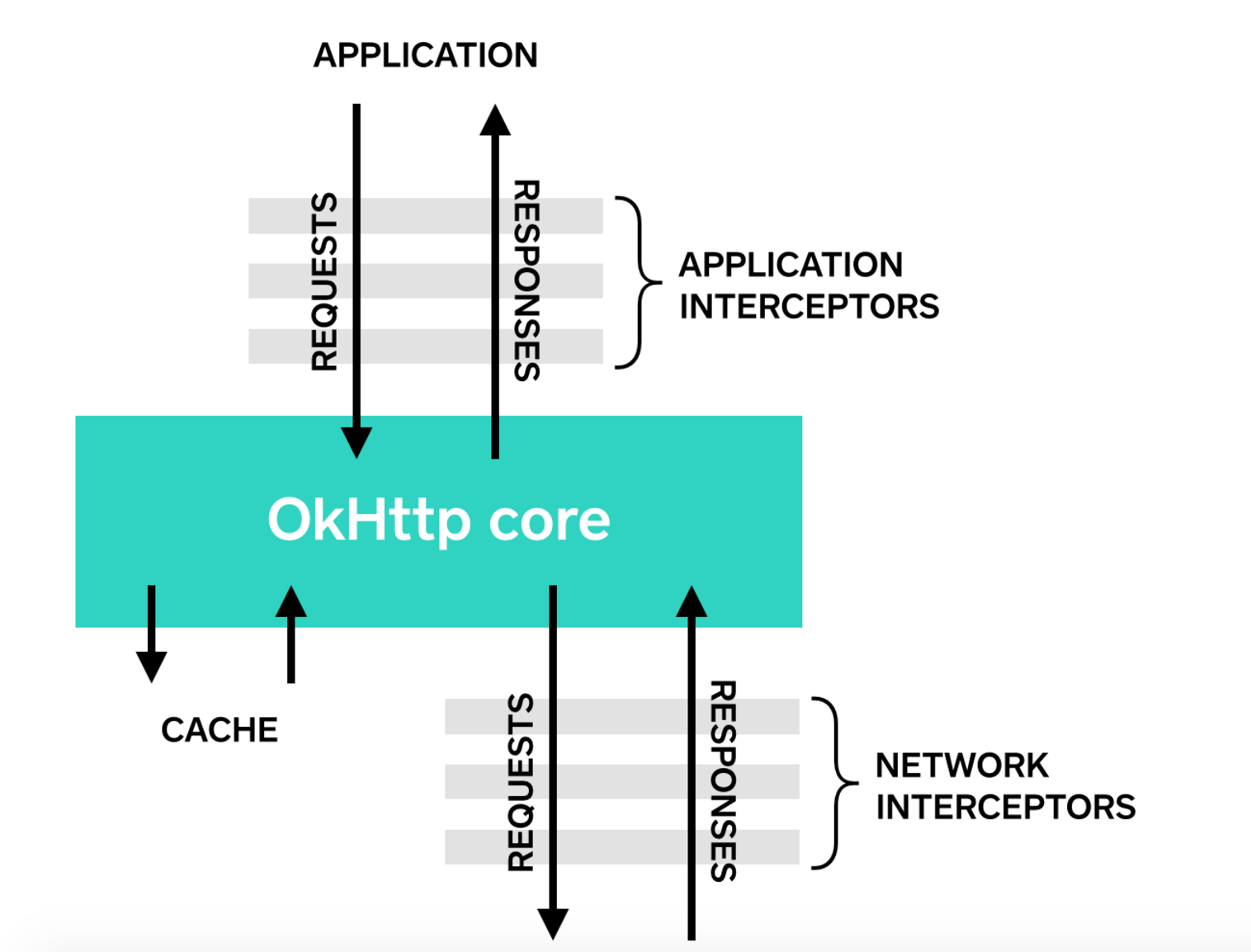
4.1 应用拦截器
拦截器可以注册为应用拦截器或网络拦截器。我们将使用 LoggingInterceptor 来区别。
通过在 OkHttpClient.Builder 上调用 addInterceptor() 来注册应用程序拦截器:
OkHttpClient client = new OkHttpClient.Builder()
        .addInterceptor(new LoggingInterceptor())
        .build();

Request request = new Request.Builder()
        .url("http://www.publicobject.com/helloworld.txt")
        .header("User-Agent", "OkHttp Example")
        .build();

Response response = client.newCall(request).execute();
response.body().close();
该 URL http://www.publicobject.com/helloworld.txt 重定向到 https://publicobject.com/helloworld.txt,OkHttp 遵循这种自动重定向。我们的应用拦截器被调用一次,并且从返回的响应 chain.proceed() 具有重定向:
INFO: Sending request http://www.publicobject.com/helloworld.txt on null
User-Agent: OkHttp Example

INFO: Received response for https://publicobject.com/helloworld.txt in 1179.7ms
Server: nginx/1.4.6 (Ubuntu)
Content-Type: text/plain
Content-Length: 1759
Connection: keep-alive
我们可以看到,我们被重定向是因为 response.request().url() 不同于 request.url()。这两个日志语句记录两个不同的 URL。
4.2 网络拦截器
注册网络拦截器很类似。调用 addNetworkInterceptor() 代替 addInterceptor():
OkHttpClient client = new OkHttpClient.Builder()
        .addNetworkInterceptor(new LoggingInterceptor())
        .build();

Request request = new Request.Builder()
        .url("http://www.publicobject.com/helloworld.txt")
        .header("User-Agent", "OkHttp Example")
        .build();

Response response = client.newCall(request).execute();
response.body().close();
当我们运行这段代码,拦截器运行两次。一个是初始请求 http://www.publicobject.com/helloworld.txt,另一个是用于重定向到 https://publicobject.com/helloworld.txt。
INFO: Sending request http://www.publicobject.com/helloworld.txt on Connection{www.publicobject.com:80, proxy=DIRECT hostAddress=54.187.32.157 cipherSuite=none protocol=http/1.1}
User-Agent: OkHttp Example
Host: www.publicobject.com
Connection: Keep-Alive
Accept-Encoding: gzip

INFO: Received response for http://www.publicobject.com/helloworld.txt in 115.6ms
Server: nginx/1.4.6 (Ubuntu)
Content-Type: text/html
Content-Length: 193
Connection: keep-alive
Location: https://publicobject.com/helloworld.txt

INFO: Sending request https://publicobject.com/helloworld.txt on Connection{publicobject.com:443, proxy=DIRECT hostAddress=54.187.32.157 cipherSuite=TLS_ECDHE_RSA_WITH_AES_256_CBC_SHA protocol=http/1.1}
User-Agent: OkHttp Example
Host: publicobject.com
Connection: Keep-Alive
Accept-Encoding: gzip

INFO: Received response for https://publicobject.com/helloworld.txt in 80.9ms
Server: nginx/1.4.6 (Ubuntu)
Content-Type: text/plain
Content-Length: 1759
Connection: keep-alive
网络请求还包含很多数据,如 OkHttp 加入 Accept-Encoding: gzip 头部通知支持压缩响应。网络拦截器的链具有非空的连接,它可用于询问 IP 地址和连接到网络服务器的 TLS 配置。
4.3 应用程序和网络拦截之间进行选择
每个拦截器链 (Interceptor Chain) 具有相对优势。
应用拦截器
- 不必担心像重定向和重试的中间响应。
- 总是被调用一次,即使 HTTP 响应来自缓存服务。
- 观察应用程序的原意。不关心 OkHttp 注入的头文件,如 If-None-Match。
- 允许短路和不调用
Chain.proceed()。 - 允许重试,并多次调用
Chain.proceed()。
网络拦截器
- 能够操作像重定向和重试的中间响应。
- 在短路网络上不调用缓存的响应。
- 观察在网络上传输的数据。
- 访问
Connection承载请求。
4.4 重写请求
拦截器可以添加、删除或替换请求头。他们还可以转换请求体。例如,如果你连接到已知支持它的网络服务器,你可以使用应用程序拦截器添加请求体的压缩。
/** This interceptor compresses the HTTP request body. Many webservers can't handle this! */
final class GzipRequestInterceptor implements Interceptor {
    @Override public Response intercept(Interceptor.Chain chain) throws IOException {
        Request originalRequest = chain.request();
        if (originalRequest.body() == null || originalRequest.header("Content-Encoding") != null) {
            return chain.proceed(originalRequest);
        }

        Request compressedRequest = originalRequest.newBuilder()
                .header("Content-Encoding", "gzip")
                .method(originalRequest.method(), gzip(originalRequest.body()))
                .build();
        return chain.proceed(compressedRequest);
    }

    private RequestBody gzip(final RequestBody body) {
        return new RequestBody() {
            @Override public MediaType contentType() {
                return body.contentType();
            }

            @Override public long contentLength() {
                return -1; // We don't know the compressed length in advance!
            }

            @Override public void writeTo(BufferedSink sink) throws IOException {
                BufferedSink gzipSink = Okio.buffer(new GzipSink(sink));
                body.writeTo(gzipSink);
                gzipSink.close();
            }
        };
    }
}
4.5 重写响应
相对应的,拦截器也可以重写响应头和转换响应体。通常不要重写请求头,因为它可能违反了 Web 服务器的期望导致更危险!
在一个棘手的情况下,如果已经做好应对的后果,重写响应头是解决问题的有效方式。例如,您可以修复服务器的配置错误的 Cache-Control 响应头以便更好地响应缓存:
/** Dangerous interceptor that rewrites the server's cache-control header. */
private static final Interceptor REWRITE_CACHE_CONTROL_INTERCEPTOR = new Interceptor() {
    @Override public Response intercept(Interceptor.Chain chain) throws IOException {
        Response originalResponse = chain.proceed(chain.request());
        return originalResponse.newBuilder()
                .header("Cache-Control", "max-age=60")
                .build();
    }
};
通常此方法效果最好,它补充了在 Web 服务器上相应的修复!
4.6 可用性
OkHttp 的拦截器需要 OkHttp 2.2 或更高。不幸的是,拦截器不能与 OkUrlFactory 工作,或者建立在这之上的库,包括 Retrofit ≤1.8 和 Picasso≤2.4。
HTTPS
OkHttp 试图平衡两个相互竞争的担忧:
当涉及到 HTTPS 服务器的连接,OkHttp 需要知道提供哪些 TLS 版本 和 密码套件。如果客户端想要最大限度地连接包括过时的 TLS 版本和弱由设计的密码套件。通过使用最新版本的 TLS 和实力最强的加密套件来最大限度地提高客户端的安全性。
具体的安全与连接是由 ConnectionSpec 接口决定。OkHttp 包括三个内置的连接规格:
- MODERN_TLS 是连接到现代的 HTTPS 服务器安全的配置。
- COMPATIBLE_TLS 是连接到一个安全,但不是现代的 HTTPS 服务器的安全配置。
- CLEARTEXT 是用于不安全配置的 http:// 网址。
默认情况下,OkHttp 先尝试 MODERN_TLS 连接,如果现代配置失败的话将退回到 COMPATIBLE_TLS 连接。
在每一个规范的 TLS 版本和密码套件都可随每个发行版而更改。例如,在 OkHttp 2.2,我们下降支持响应 POODLE 攻击的 SSL 3.0。而在 OkHttp 2.3 我们下降的支持 RC4。对于桌面 Web 浏览器,保持最新的 OkHttp 是保持安全的最好办法。
你可以用一组自定义 TLS 版本和密码套件建立自己的连接规格。例如,限制配置三个备受推崇的密码套件。它的缺点是,它需要的 Android 5.0+ 和一个类似的电流网络服务器。
ConnectionSpec spec = new ConnectionSpec.Builder(ConnectionSpec.MODERN_TLS)
        .tlsVersions(TlsVersion.TLS_1_2)
        .cipherSuites(
              CipherSuite.TLS_ECDHE_ECDSA_WITH_AES_128_GCM_SHA256,
              CipherSuite.TLS_ECDHE_RSA_WITH_AES_128_GCM_SHA256,
              CipherSuite.TLS_DHE_RSA_WITH_AES_128_GCM_SHA256)
        .build();

OkHttpClient client = new OkHttpClient.Builder()
        .connectionSpecs(Collections.singletonList(spec))
        .build();
5.1 证书钉扎 (Certificate Pinning)
默认情况下,OkHttp 信任主机平台的证书颁发机构。这种策略最多的连接,但它受证书颁发机构的袭击,如 2011 DigiNotar 的攻击。它还假定您的 HTTPS 服务器的证书是由证书颁发机构签署。
使用 CertificatePinner 来限制哪些证书和证书颁发机构是可信任的。证书钉扎增强了安全性,但这会限制你的服务器团队更新自己的 TLS 证书。在没有你的服务器的 TLS 管理员的同意下,不要使用证书钉扎!
public CertificatePinning() {
    client = new OkHttpClient.Builder()
            .certificatePinner(new CertificatePinner.Builder()
                    .add("publicobject.com", "sha256/afwiKY3RxoMmLkuRW1l7QsPZTJPwDS2pdDROQjXw8ig=")
                    .build())
            .build();
}

public void run() throws Exception {
    Request request = new Request.Builder()
            .url("https://publicobject.com/robots.txt")
            .build();

    Response response = client.newCall(request).execute();
    if (!response.isSuccessful()) throw new IOException("Unexpected code " + response);

    for (Certificate certificate : response.handshake().peerCertificates()) {
        System.out.println(CertificatePinner.pin(certificate));
    }
}
5.2 定制信任证书
下面完整的代码示例演示了如何用自定义证书替换主机平台的证书。如上所述,在没有你的服务器的 TLS 管理员的同意下,不要使用自定义证书!
private final OkHttpClient client;

public CustomTrust() {
    SSLContext sslContext = sslContextForTrustedCertificates(trustedCertificatesInputStream());
    client = new OkHttpClient.Builder()
            .sslSocketFactory(sslContext.getSocketFactory())
            .build();
}

public void run() throws Exception {
    Request request = new Request.Builder()
            .url("https://publicobject.com/helloworld.txt")
            .build();

    Response response = client.newCall(request).execute();
    System.out.println(response.body().string());
}

private InputStream trustedCertificatesInputStream() {
    ... // Full source omitted. See sample.
}

public SSLContext sslContextForTrustedCertificates(InputStream in) {
    ... // Full source omitted. See sample.
}说明:本文档内容基于 OkHttp 3.x 版本官方 Wiki 翻译整理,部分链接指向 3.x 文档。OkHttp 后续版本(4.x/5.x)在 API 设计上可能有显著变化(如 Kotlin 支持、协程支持等),使用时请参考最新官方文档。
版权声明:本文为原创文章,版权归 戴老师的博客 所有,转载请联系博主获得授权。
本文地址:https://1diff.fun/archives/okhttp-guan-fang-zhong-wen-wen-dang.html
如果对本文有什么问题或疑问都可以在评论区留言,我看到后会尽量解答。