jdom解析xml
Introduction
Nobody wants to write markup by hand, and general-purpose XML editors are often too clunky for specific tasks. Instead, we can write a Java program to edit such collections programmatically.
XML Structure
First, consider the structure of the XML data we intend to process. Below is an example of a business card collection:
<cards>
  <card>
    <name>John Doe</name>
    <title>CEO, Widget Inc.</title>
    <email>john.doe@widget.com</email>
    <phone>(202) 456-1414</phone>
    <logo url="widget.gif" />
  </card>
  <card>
    <name>Michael Schwartzbach</name>
    <title>Associate Professor</title>
    <email>mis@brics.dk</email>
    <phone>+45 8610 8790</phone>
    <logo url="http://www.brics.dk/~mis/portrait.gif" />
  </card>
  <card>
    <name>Anders Møller</name>
    <title>Research Assistant Professor</title>
    <email>amoeller@brics.dk</email>
    <phone>+45 8942 3475</phone>
    <logo url="http://www.brics.dk/~amoeller/am.jpg"/>
  </card>
</cards>
Java Representation
To manipulate this data, we need a high-level representation of a business card in Java. We define a simple Card class:
class Card {
  public String name, title, email, phone, logo;

  public Card(String name, String title, String email, String phone, String logo) {
    this.name = name;
    this.title = title;
    this.email = email;
    this.phone = phone;
    this.logo = logo;
  }
}
Parsing XML to Objects
An XML document must be translated into a vector of such objects. Using JDOM, we can parse the document and extract the relevant fields:
Vector doc2vector(Document d) {
  Vector v = new Vector();
  Iterator i = d.getRootElement().getChildren().iterator();
  while (i.hasNext()) {
    Element e = (Element)i.next();
    String phone = e.getChildText("phone");
    if (phone == null) phone = "";
    Element logo = e.getChild("logo");
    String url;
    if (logo == null) url = ""; else url = logo.getAttributeValue("url");
    Card c = new Card(e.getChildText("name"),  // exploit schema,
                      e.getChildText("title"), // assume validity
                      e.getChildText("email"),
                      phone,
                      url);
    v.add(c);
  }
  return v;
}
Writing Objects to XML
Conversely, we need to convert the vector of objects back into an XML document:
Document vector2doc() {
  Element cards = new Element("cards");
  for (int i = 0; i < cardvector.size(); i++) {
    Card c = (Card)cardvector.elementAt(i);
    if (c != null) {
      Element card = new Element("card");
      Element name = new Element("name");
      name.addContent(c.name);
      card.addContent(name);
      Element title = new Element("title");
      title.addContent(c.title);
      card.addContent(title);
      Element email = new Element("email");
      email.addContent(c.email);
      card.addContent(email);
      if (!c.phone.equals("")) {
        Element phone = new Element("phone");
        phone.addContent(c.phone);
        card.addContent(phone);
      }
      if (!c.logo.equals("")) {
        Element logo = new Element("logo");
        logo.setAttribute("url", c.logo);
        card.addContent(logo);
      }
      cards.addContent(card);
    }
  }
  return new Document(cards);
}
GUI Editor
A little logic and some GUI components complete the editor. Below is a snapshot of the application interface:
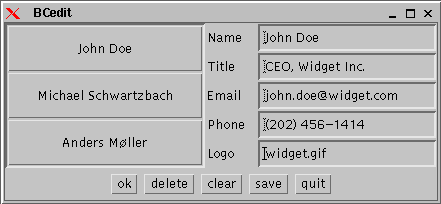
To compile the application, ensure you have the necessary libraries in your classpath:
javac -classpath xerces.jar:jdom.jar BCedit.javaComplete Source Code
Below is the complete source code for the BCedit application, including the GUI logic and event handling:
import java.awt.*;
import java.awt.event.*;
import java.io.*;
import java.util.*;
import org.jdom.*;
import org.jdom.input.*;
import org.jdom.output.*;

class Card {
  public String name, title, email, phone, logo;

  public Card(String name, String title, String email, String phone, String logo) {
    this.name = name;
    this.title = title;
    this.email = email;
    this.phone = phone;
    this.logo = logo;
  }
}

public class BCedit extends Frame implements ActionListener {
  Button ok = new Button("ok");
  Button delete = new Button("delete");
  Button clear = new Button("clear");
  Button save = new Button("save");
  Button quit = new Button("quit");
  TextField name = new TextField(20);
  TextField title = new TextField(20);
  TextField email = new TextField(20);
  TextField phone = new TextField(20);
  TextField logo = new TextField(20);
  Panel cardpanel = new Panel(new GridLayout(0,1));
  String cardfile;
  Vector cardvector;
  int current = -1;

  public static void main(String[] args) { new BCedit(args[0]); }

  Vector doc2vector(Document d) {
    Vector v = new Vector();
    Iterator i = d.getRootElement().getChildren().iterator();
    while (i.hasNext()) {
      Element e = (Element)i.next();
      String phone = e.getChildText("phone");
      if (phone == null) phone = "";
      Element logo = e.getChild("logo");
      String url;
      if (logo == null) url = ""; else url = logo.getAttributeValue("url");
      Card c = new Card(e.getChildText("name"),
                        e.getChildText("title"),
                        e.getChildText("email"),
                        phone,
                        url);
      v.add(c);
    }
    return v;
  }

  Document vector2doc() {
    Element cards = new Element("cards");
    for (int i = 0; i < cardvector.size(); i++) {
      Card c = (Card)cardvector.elementAt(i);
      if (c != null) {
        Element card = new Element("card");
        Element name = new Element("name");
        name.addContent(c.name);
        card.addContent(name);
        Element title = new Element("title");
        title.addContent(c.title);
        card.addContent(title);
        Element email = new Element("email");
        email.addContent(c.email);
        card.addContent(email);
        if (!c.phone.equals("")) {
          Element phone = new Element("phone");
          phone.addContent(c.phone);
          card.addContent(phone);
        }
        if (!c.logo.equals("")) {
          Element logo = new Element("logo");
          logo.setAttribute("url", c.logo);
          card.addContent(logo);
        }
        cards.addContent(card);
      }
    }
    return new Document(cards);
  }

  void addCards() {
    cardpanel.removeAll();
    for (int i = 0; i < cardvector.size(); i++) {
      Card c = (Card)cardvector.elementAt(i);
      if (c != null) {
        Button b = new Button(c.name);
        b.setActionCommand(String.valueOf(i));
        b.addActionListener(this);
        cardpanel.add(b);
      }
    }
    this.pack();
  }

  public BCedit(String cardfile) {
    super("BCedit");
    this.cardfile = cardfile;
    try {
      cardvector = doc2vector(new SAXBuilder().build(new File(cardfile)));
    } catch (Exception e) { e.printStackTrace(); }
    this.setLayout(new BorderLayout());
    ScrollPane s = new ScrollPane();
    s.setSize(200, 0);
    s.add(cardpanel);
    this.add(s, BorderLayout.WEST);
    Panel l = new Panel(new GridLayout(5, 1));
    l.add(new Label("Name"));
    l.add(new Label("Title"));
    l.add(new Label("Email"));
    l.add(new Label("Phone"));
    l.add(new Label("Logo"));
    this.add(l, BorderLayout.CENTER);
    Panel f = new Panel(new GridLayout(5, 1));
    f.add(name);
    f.add(title);
    f.add(email);
    f.add(phone);
    f.add(logo);
    this.add(f, BorderLayout.EAST);
    Panel p = new Panel();
    ok.addActionListener(this);
    p.add(ok);
    delete.addActionListener(this);
    p.add(delete);
    clear.addActionListener(this);
    p.add(clear);
    save.addActionListener(this);
    p.add(save);
    quit.addActionListener(this);
    p.add(quit);
    this.add(p, BorderLayout.SOUTH);
    addCards();
    this.show();
  }

  public void actionPerformed(ActionEvent event) {
     Card c;
     String command = event.getActionCommand();
     if (command.equals("ok")) {
       c = new Card(name.getText(),
                    title.getText(),
                    email.getText(),
                    phone.getText(),
                    logo.getText());
       if (current == -1) {
          cardvector.add(c);
       } else {
          cardvector.setElementAt(c, current);
       }
       addCards();
     } else if (command.equals("delete")) {
        if (current != -1) {
          cardvector.setElementAt(null, current);
          addCards();
        }
     } else if (command.equals("clear")) {
        current = -1;
        name.setText("");
        title.setText("");
        email.setText("");
        phone.setText("");
        logo.setText("");
     } else if (command.equals("save")) {
        try {
          new XMLOutputter().output(vector2doc(), new FileOutputStream(cardfile));
        } catch (Exception e) { e.printStackTrace(); }
     } else if (command.equals("quit")) {
        System.exit(0);
     } else {
        current = Integer.parseInt(command);
        c = (Card)cardvector.elementAt(current);
        name.setText(c.name);
        title.setText(c.title);
        email.setText(c.email);
        phone.setText(c.phone);
        logo.setText(c.logo);
     }
  }
}
Observations & Conclusion
This example illustrates several general observations regarding XML processing with JDOM:
- Domain-Specific Structures: XML documents are parsed via JDOM into domain-specific data structures (like the
Cardclass). - Validation Assumptions: If the input is known to validate according to some schema, many runtime errors can be assumed never to occur.
- Output Validity: A remaining challenge is ensuring that the output of
vector2docis valid according to the schema (well-formedness is guaranteed for free). Ensuring schema validity upon generation is a current research challenge.
Note on Legacy Code: This article references older Java technologies (AWT,Vector, raw types without generics) and earlier versions of JDOM. While the concepts remain valid for understanding XML object mapping, modern implementations should utilize Swing/JavaFX, Collections Framework (ArrayList), generics, and updated XML processing libraries.
版权声明:本文为原创文章,版权归 戴老师的博客 所有,转载请联系博主获得授权。
本文地址:https://1diff.fun/archives/jdom-jie-xi-xml.html
如果对本文有什么问题或疑问都可以在评论区留言,我看到后会尽量解答。